
Checkout tax is available in the Web Store mode. The tax settings are located in Products > Settings > General Settings, inside the Payment and currency section near the bottom of the page. The same section holds the currency settings.
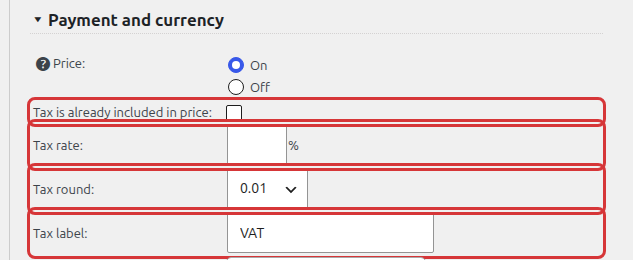
Set Shopping Cart Checkout Tax Rate
The shopping cart checkout tax rate can be set in the Tax rate field. Enter any positive percentage to apply checkout tax. Tax calculation is disabled when the field is empty or set to zero. One tax rate applies to all products.
The tax will be calculated as a percentage of product price total multiplied by ordered quantity: order_total * tax_rate.
You can check the Tax is already included in price checkbox if you enter the product prices with tax already applied. In such case the tax calculation will be: order_total – (order_total / (1 + tax_rate)).
Tax round
The tax round feature is there to help tax implementation in various countries. Set the tax round according to your country regulations. Choose 1, 0.1, 0.01 (default), 0.001 or 0.0001. For example, set the tax round setting to 1 to round the tax to a whole dollar.
Tax Label
The default tax label is VAT. Change it to any desired tax label, for example Tax or GST. The label is shown in the checkout summary.