
The notification emails are sent each time a customer submits an order in the Web Store mode.
The order notification settings are located in Products > Settings > General Settings > Shopping Cart, in the Email settings section.
These settings allow you to define the notification emails sent to the customer and the eCommerce Product Catalog administrator.
Admin email addresses
You can configure two email addresses:
- Email to receive orders – one or multiple addresses (comma separated)
- Email to send confirmations – the sender address
Both can be the same.
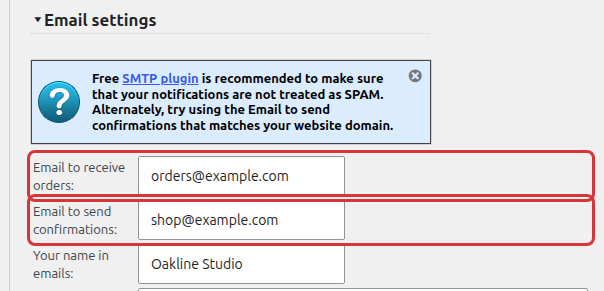
You can also set the name that shows up as the email sender in Your name in emails.
To make sure the notifications are not treated as spam, use a sender address that matches your website domain, or an SMTP plugin.
Email Notifications Templates
The notification templates are fully customizable. You can also use HTML tags. Change the default email templates to modify the email notification text.
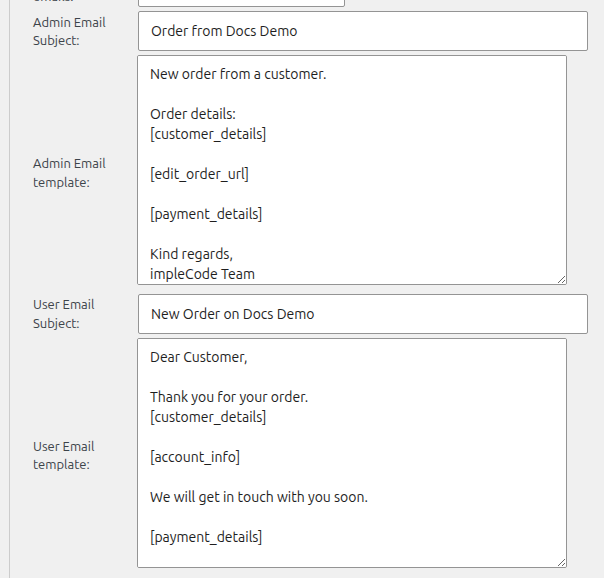
You can edit both the admin and the customer email: Admin Email Subject and Admin Email template, User Email Subject and User Email template.
The default templates already contain shortcodes such as [customer_details] for the ordered products and the form data. See Checkout email notification shortcodes for all of them.
For the inquiry emails in the Inquiry Catalog mode, see Quote Cart Email Notifications.