
The custom email header and footer feature lets you replace the default branding in your store emails with your own header text, footer text and footer link. It is part of the Email Design screen and is included with Quote Cart PRO and Shopping Cart PRO.
Where to find it
Go to Products > Settings > Catalog Design > Email Design. The header and footer settings are on the Email Design form, next to the live email preview.
These settings apply to the Modern email layout. If Email layout is set to Classic, your emails keep their current look and the header and footer settings are not used. Select Modern to preview them, then click Save changes to apply them to your emails.
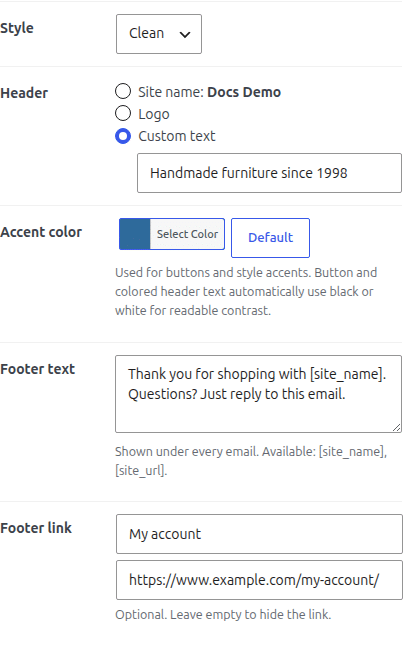
Custom header text
The Header setting controls what appears at the top of every email. Without a PRO extension you can choose:
- Site name: your WordPress site title.
- Logo: a PNG or JPG image, shown at up to 200 × 60 px.
With Quote Cart PRO or Shopping Cart PRO, a third option is available:
- Custom text: a single line of your own text, for example “Handmade furniture since 1998”.
If you choose Custom text and leave the field empty, the email shows your site name.
Custom footer text
The Footer text field sets the text shown under every email. The default is “This email is a service from [site_name].”
You can use these placeholders:
- [site_name]: your site title, linked to your home page.
- [site_url]: your site address as plain text.
The footer text is plain text. Line breaks are kept and HTML is removed.
Footer link
The Footer link setting adds one link below the footer text, for example a link to the customer account page. It has two fields:
- Link text: the words customers see, for example “My account”.
- Link address: the full URL, starting with http:// or https://.
The link is shown only when both fields are filled in. Leave them empty to hide the link.
Preview and test
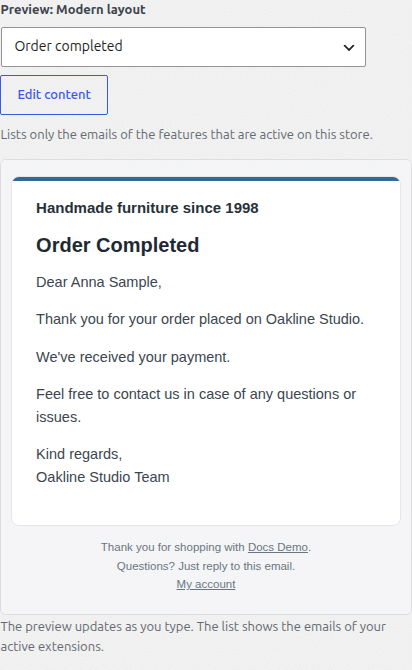
The preview next to the form updates as you change the header and footer. Use the preview menu to see how different emails look. Click Send a test email to to send a sample to the site admin email address. Nothing changes for your customers until you click Save changes.
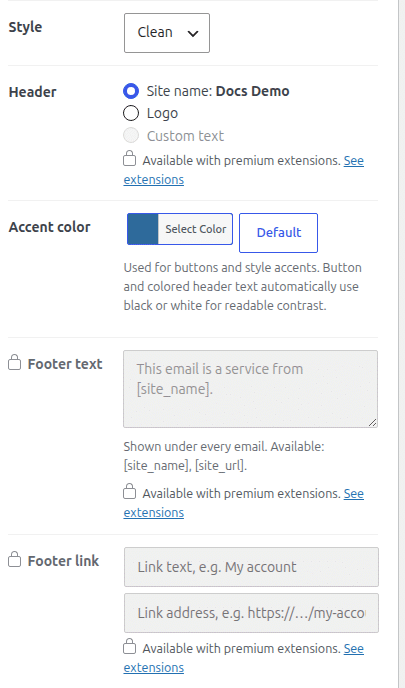
Without a PRO extension
When neither Quote Cart PRO nor Shopping Cart PRO is active, the Custom text header option, Footer text and Footer link are shown as locked, with a link to the extensions that include them. Emails then use your site name or logo in the header, the default footer text, and no footer link.
Values saved earlier are kept. If you deactivate the PRO extension, your custom header and footer stop showing in emails. When you activate it again, they are used again without re-entering them.
Which emails use it
The header and footer appear in every store email sent with the Modern layout, including order, quote and inquiry emails. Emails sent as plain text do not use the email design.