
With Smart Multiple Catalogs and Product Attributes PRO active together, you can choose which catalogs each attribute group is used for. For example, a “Technical details” group can show only for products in a Hardware catalog, while a “Licensing” group shows only in a Software catalog.
Only attribute groups can be limited to catalogs. The default product attributes table always shows for products in all catalogs.
Choose the catalogs for an attribute group
Go to Products > Settings > Attributes and scroll to Attribute Groups. Next to each group name there is a Used for field.
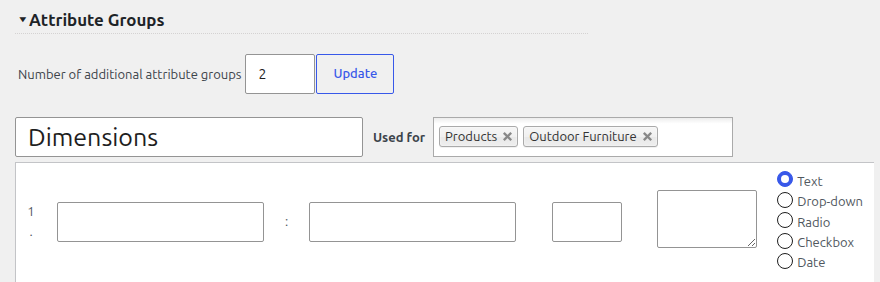
- Click the Used for field and pick a catalog from the list. The list contains the main catalog and every additional catalog created with Smart Multiple Catalogs.
- Pick more catalogs if the group should show in several of them.
- To remove a catalog, click the small x on its name.
- Click Save changes at the bottom of the settings page.
When the field is empty it shows Any catalog. This is the default, and the group is used for all catalogs, exactly as before.
What changes when a group is limited to catalogs
For products in the selected catalogs nothing changes. For products in any other catalog:
- The group table is not shown on the product page.
- The group is not shown in product comparison tables and plans tables.
- The group box is not shown on the product edit screen, so no new values can be entered for the group there.
Values already saved in the group for such products are kept. Saving the product does not remove them, and they show up again if you add the product’s catalog to the group or switch the group back to Any catalog.
Product attribute filters and search are not limited by this setting. Group values that products already have stay available there.
Removed catalogs and deactivated plugins
- If a selected catalog is later removed, it is ignored. When none of the selected catalogs exist anymore, the group is used for all catalogs again.
- If you deactivate Smart Multiple Catalogs, the Used for field disappears and all attribute groups show for all products. Your selections are kept and apply again when you reactivate the plugin.
- Product types that are not catalogs, such as product bundles, are never limited by this setting.